 Relay
Guides Set up
Sign in to your agency
Use the email from your invitation to open your agency's workspace in Relay.
Step 1: Use the email from your invitation
Open Relay and sign in with the email address your agency invited. If your agency uses Microsoft or Google sign-in, you'll see Sign in with Microsoft or Continue with Google; otherwise use your password.
Relay opens your agency's Work board.
Your agency administrator manages Relay access. If your invitation expired or the email doesn't work, ask them; Relay support can't add you to an agency.
Step 2: Your first visit
The first time you sign in, Relay walks you through a short welcome and offers a practice quote with a made-up client. It's a good way to see the screens, but it doesn't use ChatGPT or your real carriers.
When you're done, Connect ChatGPT and check your carriers before your first real quote.
Step 3: Check your connections
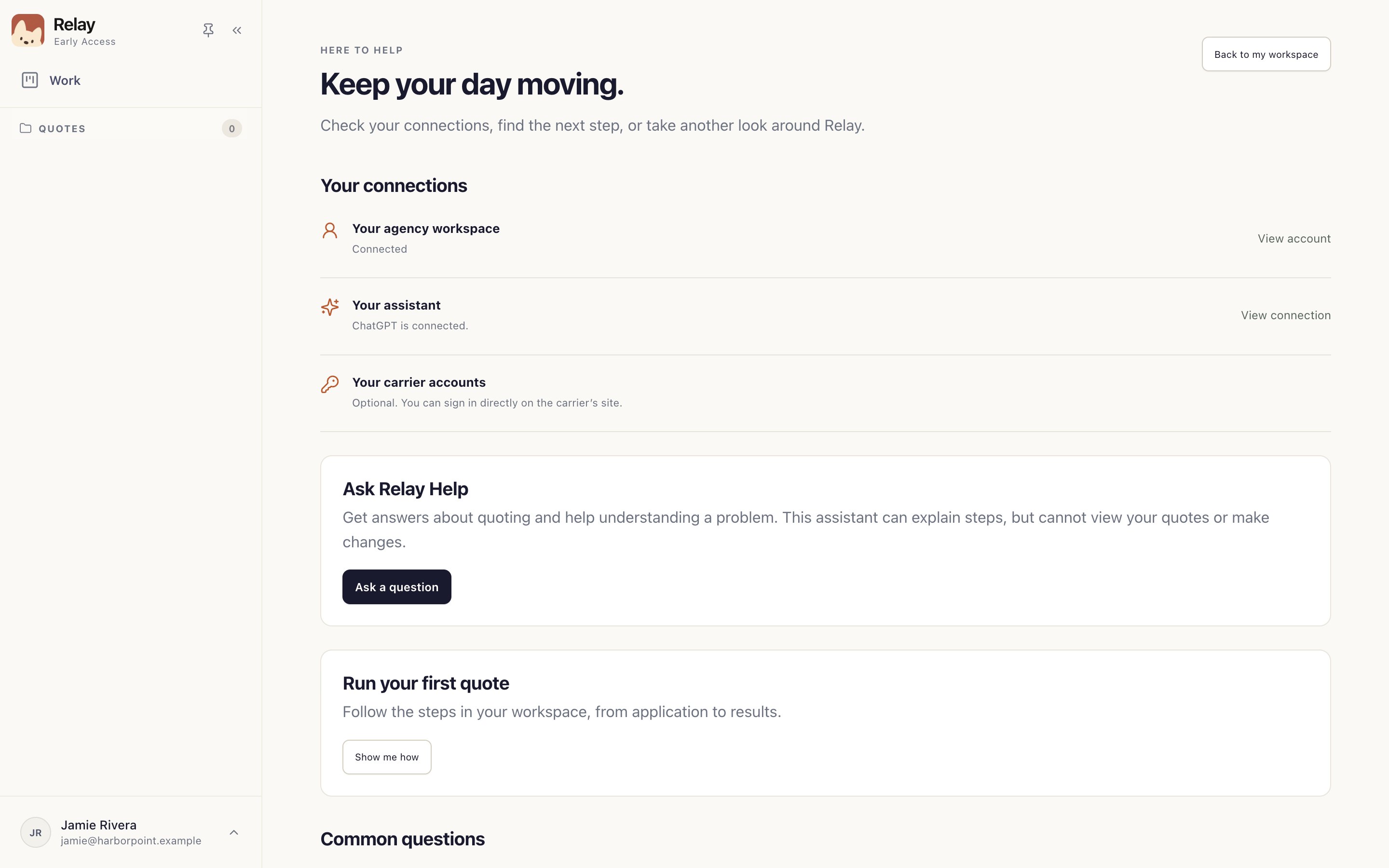
Open your account menu › Help & training. Your connections shows your agency workspace 1, your assistant 2 and carrier accounts 3 in one place.
Something not working?
Relay says “Let’s reconnect to your agency.”
Check your internet connection and choose Try again. That screen doesn't mean your work was deleted or your password is wrong. If it keeps happening, ask your agency administrator to check your access.